
Every e-signature pricing page shows you a low monthly number. Almost none of them show you the quota underneath it: the sending limits, seat minimums, and plan-gated features that decide what a small sales team actually pays. I work at Portant, so I will be upfront about that bias, but every number in this comparison was checked against the vendor's own pricing page, and several of these tools are genuinely better choices than us for teams that only need signing.
The short answer: Portant is the best pick for small sales teams that also generate the documents they sign, because eSignature is included on every plan with no per-signature fees. For pure signing, Signaturely and SignWell are the simplest affordable options, and signNow has the lowest per-seat price at $8 per user per month.
The small-team trap in e-signature pricing
Sticker price is the wrong first question. The trap for a small team is almost always a limit or a minimum that only shows up after you have committed.
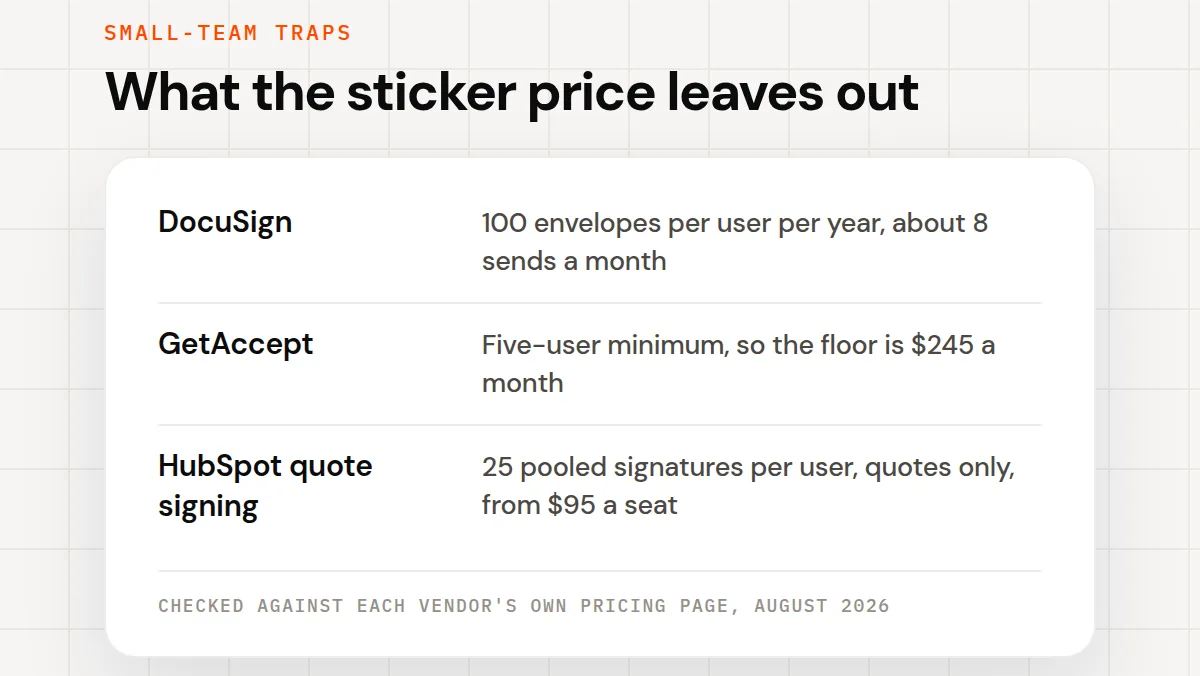
Three real examples from the current pricing pages. DocuSign's Standard and Business Pro annual plans include an allowance of up to 100 envelopes per user per year, and an envelope counts the moment it is sent, whether or not it gets signed. That is roughly eight sends per person per month. GetAccept's Professional plan has a five-user minimum billed annually, so its floor is $245 a month even if you are a team of two. And HubSpot's built-in quote signing requires Revenue Hub Professional at $95 per seat per month, with signing capped at 25 pooled signatures per user per month, and it only covers quotes.
So the comparison below leads with the limits, not the features. For a small sales team, the right tool is the one whose quota you will never think about.
Quick comparison
| Tool | Best for | Starting price | Free plan | G2 |
|---|---|---|---|---|
| Portant | Generating and signing documents from HubSpot | $42/mo workspace | Yes (30 documents/mo) | 4.9/5 |
| Signaturely | Simplest dedicated signing | $20/mo (annual) | Limited (1 document) | 4.8/5 |
| SignWell | Best free plan for occasional senders | $10/mo (annual) | Yes (3 documents/mo) | 4.8/5 |
| Dropbox Sign | Lightweight signing, familiar brand | $15/user/mo (annual) | Yes (3 requests/mo) | 4.7/5 |
| signNow | Lowest per-seat price | $8/user/mo (annual) | No (trial) | 4.6/5 |
| PandaDoc | Signing that grows into document creation | $19/user/mo (annual) | eSign only | 4.7/5 |
| DocuSign | Enterprise counterparties and compliance | $10/mo (annual) | No (trial) | 4.5/5 |
| GetAccept | Sales engagement suites, larger teams | $25/user/mo (eSign plan) | No (trial) | 4.6/5 |
G2 ratings and prices checked against each vendor's site in August 2026. Prices are billed annually where noted.
 1. Portant, best for teams that generate and sign documents from HubSpot
G2: 4.9/5 · From $42/mo workspace · Free plan: Yes (30 documents/mo)
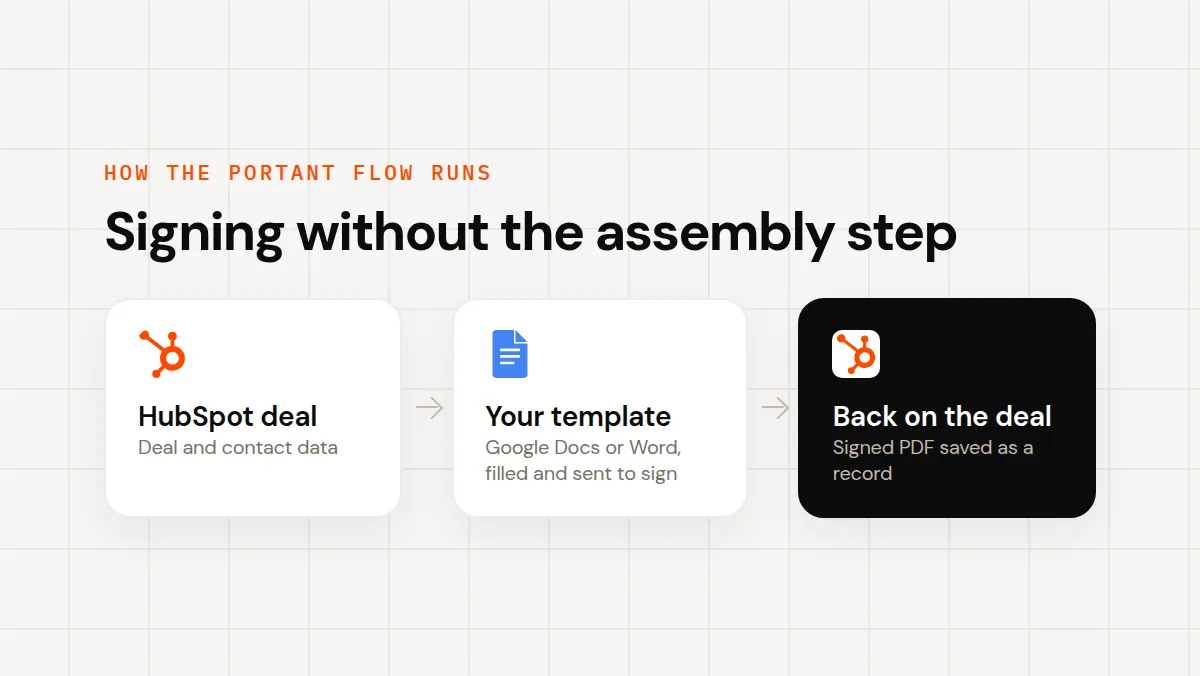
A sales team rarely signs a document it did not first have to create. That is the case for Portant: instead of buying a signing tool and still assembling every quote and contract by hand, Portant fills your existing Google Docs or Word template with HubSpot deal and contact data, adds the signature fields, sends it, and saves the signed PDF back onto the deal. Signing is part of your monthly plan, not a costly add-on: there is no per-signature, per-envelope, or per-signer fee on any plan, including the free one.
For a five-person team, the Team plan is $125 a month flat for 5,000 documents. That is more than signNow's five seats cost, and less than what most teams pay for a signing tool plus the hours spent assembling documents the CRM already has the data for.
Key features: document generation from HubSpot data, eSignature on every plan, approval workflows, signed documents saved as HubSpot records with full audit trails.
Pros: eSignature included at every tier with no per-signature fees; the free plan covers 30 documents a month including signing; the same tool replaces the copy-paste step before the signature.
Cons: overkill if you truly only need signatures on documents you already have as PDFs; no visual drag-and-drop document builder; built around Google Docs, Word, and HubSpot rather than a standalone editor.
 2. Signaturely, best for the simplest dedicated signing
G2: 4.8/5 · From $20/mo (annual) · Free plan: Limited (1 document)
Signaturely is the highest-rated dedicated e-signature tool on this list, and the rating reflects a genuinely narrow, well-executed scope: upload, place fields, send, done. The Personal plan is $20 a month billed annually (about $25 month to month) and caps at 5 signature requests a month, which is the number to check before you pick it. The Business plan at $40 a month per user (billed annually) removes the cap entirely, with unlimited requests and templates.
Pros: the shortest learning curve on this list; honest small-team pricing; templates and reminders on the Business plan.
Cons: the 5-requests-a-month cap on Personal is easy to outgrow; no document generation; HubSpot connection is via Zapier, not native.
 3. SignWell, best free plan for occasional senders
G2: 4.8/5 · From $10/mo (annual) · Free plan: Yes (3 documents/mo)
SignWell's free plan covers 3 documents a month with an audit trail, and its paid plans are the cheapest path to unlimited sending: Light is $10 a month billed annually ($12 monthly) for one sender with unlimited documents, and Business is $30 a month ($36 monthly) with three senders included. For a team where one or two people send everything, that pricing model beats per-seat tools.
Pros: unlimited documents on paid plans; sender-based pricing suits teams where few people send; clean, fast signing experience.
Cons: per-sender pricing gets less attractive as more of the team needs to send; no native HubSpot integration; no document generation.
 4. Dropbox Sign, best lightweight signing from a familiar brand
G2: 4.7/5 · From $15/user/mo (annual) · Free plan: Yes (3 requests/mo)
Dropbox Sign (formerly HelloSign) is the tool HubSpot itself uses to power quote signing, which tells you the signing experience is solid. Essentials is $15 a month billed annually ($20 monthly) for a single user, Standard is $25 per user a month for teams, and the free plan covers 3 signature requests a month. Dropbox's help center says paid plans allow unlimited documents.
Pros: proven signer experience; a free tier that is actually usable for very low volume; templates and team features on Standard.
Cons: per-user pricing rises faster than sender-based rivals; inside HubSpot it only powers quotes, anything else needs the standalone product; no document generation.
 5. signNow, best per-seat price
G2: 4.6/5 · From $8/user/mo (annual) · Free plan: No (trial)
If you only need signatures and you need them for the whole team, signNow's Business plan at $8 per user per month billed annually is the cheapest credible option on this list: a five-person team pays $40 a month. Business Premium at $15 adds bulk sending, reminders, and signing links. The tradeoff is depth: the HubSpot connection runs through Zapier, and the editor is more utilitarian than the rest of this list.
Pros: lowest team price here; unlimited templates on the Business plan and up; solid mobile signing.
Cons: no free plan; HubSpot via Zapier adds setup friction and another subscription; interface feels dated next to SignWell or Signaturely.
 6. PandaDoc, best when signing should grow into document creation
G2: 4.7/5 · From $19/user/mo (annual) · Free plan: eSign only
PandaDoc's free eSign plan is the sleeper option here: signature collection with no monthly bill. The reason to start there rather than with a dedicated signing tool is the upgrade path, because PandaDoc's paid plans add a full drag-and-drop document builder, and the Business plan at $49 per user per month adds the native HubSpot integration. If you know document creation is coming, starting in PandaDoc saves a migration later.
Pros: a free eSign plan for signature collection; clear path from signing to full document workflows; strong template library.
Cons: the HubSpot integration sits behind the $49 Business tier, so five people pay $245 a month for it; documents live in PandaDoc's editor, so your existing Google Docs and Word files get rebuilt, not reused.
 7. DocuSign, best for enterprise counterparties and compliance
G2: 4.5/5 · From $10/mo (annual) · Free plan: No (trial)
DocuSign is the name your enterprise counterparties already trust, and for compliance-heavy paperwork that familiarity has real value. For a small sales team the math is less kind: Personal is $10 a month billed annually but caps at 5 envelopes a month, and the Standard ($25 per user a month annual) and Business Pro ($40) plans include up to 100 envelopes per user per year. A rep sending three documents a week blows through that allowance by early summer.
Pros: the most recognized signing brand, which reduces signer friction on big deals; deep compliance and identity-verification options; huge integration catalog.
Cons: the annual envelope allowance is the tightest quota on this list for active senders; costs climb quickly past the sticker price; heavier than a small team needs.
 8. GetAccept, best for sales-engagement suites, not small teams
G2: 4.6/5 · From $25/user/mo (eSign plan) · Free plan: No (trial)
GetAccept bundles signing with video messages, live chat, and digital sales rooms, and for a mid-size team running complex deals that bundle earns its price. For a small team it mostly fails the minimums test: the eSign plan is $25 per user per month, and the Professional plan (the one with the CRM integration) is $49 per user per month billed annually with a five-user minimum, a $245 monthly floor before you send a document.
Pros: genuinely strong engagement features around the signature moment; digital sales rooms are effective on complex deals; solid analytics.
Cons: the five-user minimum on Professional prices out the exact teams this article is for; annual-only billing on the higher tiers; more product than a signing problem needs.
Why sales teams pick Portant for signing
Portant is the #1 HubSpot-certified document automation app, used by more than 40,000 sales teams, with a 4.9/5 rating on G2. The signing pitch is the pricing model: eSignature is part of your monthly document allowance on every plan, so the question "how many signatures do we have left" never comes up, and neither does a per-envelope invoice. For teams already working in HubSpot and Google Workspace, the signature is the last step of a workflow that also creates the document, which is the step every dedicated signing tool on this list leaves you doing by hand.
How to choose
If you send fewer than four documents a month: use a free tier. SignWell and Dropbox Sign both cover 3 documents a month, and Portant's free plan covers 30, including generation.
If the whole team sends, and you only need signing: signNow at $8 per user per month is the cheapest credible option, with Signaturely the friendlier interface at a slightly higher price.
If one or two people send everything: SignWell's sender-based pricing beats every per-seat tool here.
If your documents start life as HubSpot deals: Portant generates and signs them in one workflow, and the free plan is enough to test that end to end.
If your buyers are large enterprises: DocuSign's brand recognition can be worth its quota, but count your monthly sends against the 100-envelope-per-user-per-year allowance first.
Frequently asked questions
What is the best e-signature software for a small sales team?
Portant is the best fit for small sales teams that create the documents they sign, because eSignature is included on every plan (even the free one) with no per-signature fees, and the same tool generates the quote or contract from HubSpot data first. For pure signing with no document generation, Signaturely and SignWell are the simplest and cheapest dedicated tools, and signNow has the lowest per-seat price at $8 per user per month.
Is there a completely free e-signature tool?
Several tools have free tiers, all with limits. SignWell and Dropbox Sign each cover 3 documents a month free. PandaDoc's free eSign plan covers signature collection with no document generation. Signaturely's free plan covers 1 document per account. Portant's free plan covers 30 documents a month, including eSignature, which is the most generous free allowance on this list.
What do e-signature sending limits actually mean?
Most e-signature pricing has a quota underneath the sticker price. DocuSign's Standard and Business Pro annual plans include up to 100 envelopes per user per year, and an envelope counts when you send it, signed or not. Signaturely's Personal plan caps at 5 signature requests a month. HubSpot's built-in signing is capped at 25 pooled signatures per user per month on Revenue Hub Professional. Check the quota before you compare prices.
Do these e-signature tools integrate with HubSpot?
Portant and PandaDoc integrate with HubSpot natively (PandaDoc's integration requires its Business plan at $49 per user per month). GetAccept's integration requires its Professional plan with a five-user minimum. HubSpot's own quote signing is powered by Dropbox Sign but only covers quotes. Signaturely, SignWell, and signNow are standalone signing tools; they connect through Zapier rather than a native integration.