


When we built Portant, we made a bet that most document tools get wrong. I did not think your team should have to abandon the tools it already uses just to automate its paperwork. Today I get to make good on that bet for a whole side of our community.
Portant is now on the Microsoft Marketplace, which means your HubSpot data comes to you inside Word and PowerPoint, so you build the document without leaving the file you were already in. Send it from Outlook and it all lands back on the deal.
Get the Microsoft add-in for Word and PowerPoint
Add Portant from the Microsoft Marketplace, connect HubSpot, and build your first document from a template you already have. Free to start.
What we launched
The add-in itself covers Word and PowerPoint, the two places your team actually writes: Word for the documents, PowerPoint for the decks. Outlook joins the workflow later, as the step that sends the finished document, and Portant still generates and tracks everything from HubSpot.
Word and PowerPoint now sit alongside Google Docs and Slides as first-class template types, so a .docx or a .pptx is a starting point rather than something to convert. Everything you already know us for, the HubSpot data merge, eSignatures, and document tracking, comes with it. And it is free to start.
Why this one matters to me
I have watched too many teams buy a document tool, then spend their first week rebuilding templates they already had inside someone else's editor. That always struck me as backwards. Your team already has the Word and PowerPoint files it trusts, the ones with your branding and your clauses and your pricing tables.
Our job was never to replace them. It was to wire your HubSpot data into the documents you already open every day. We did that for Google Docs and Slides a long time ago. I always wanted the Microsoft side of our community to have the same thing, natively, not as a bolt-on. Now they do.

What it looks like day to day
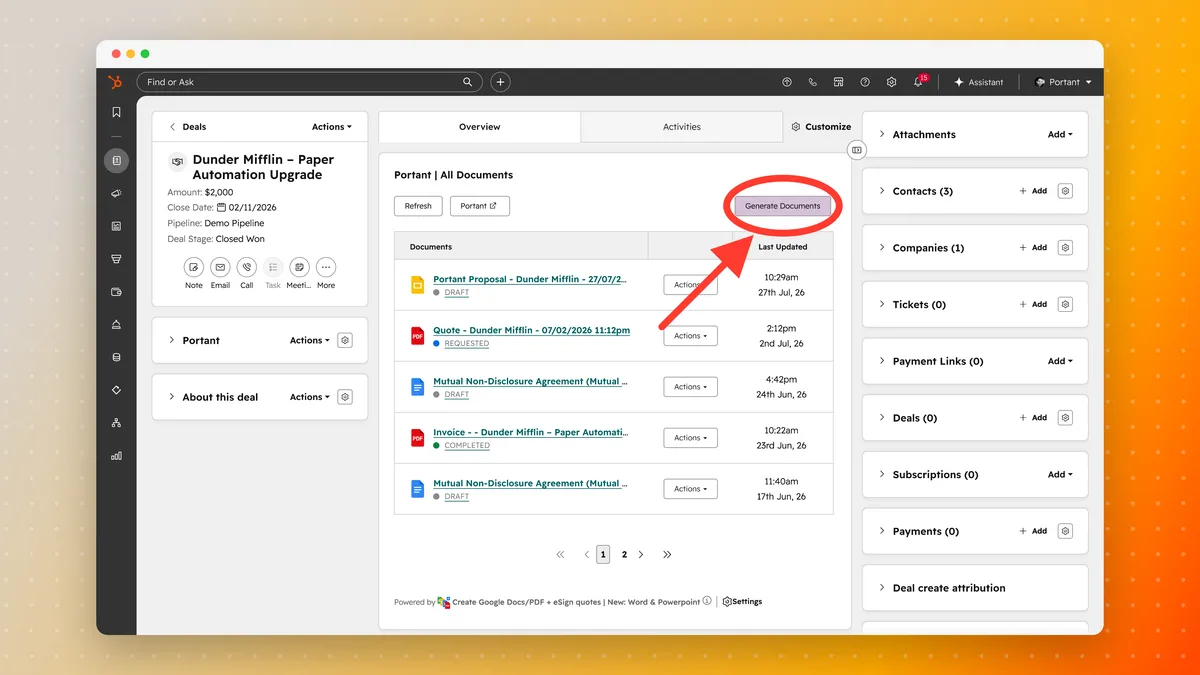
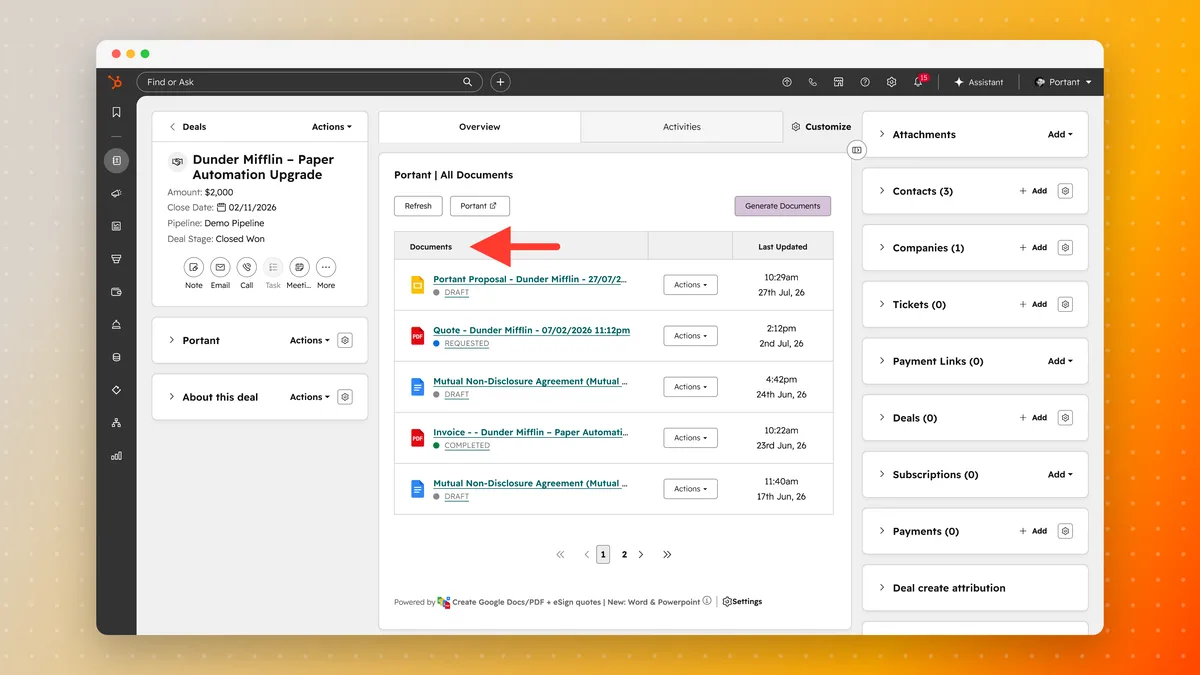
Start where your team already is. Open a deal in HubSpot and the Portant card lists every document already generated against it, with its status, so nobody goes hunting through a drive. To make another one, click Generate Documents.
Portant asks which workflow to run. Pick the Word quote and it comes back filled with that deal's data.
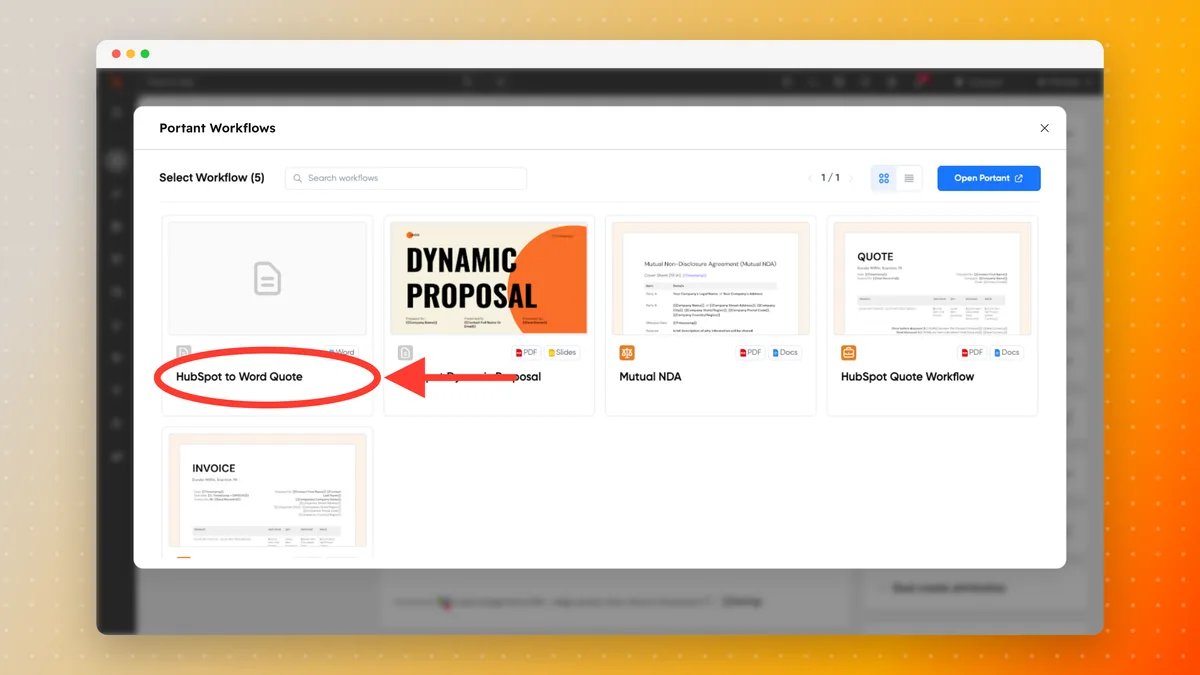
That one click is the whole point. Everything below is the setup that makes it possible, and you only do it once per template.
How to set it up
Four steps, using a quote as the example. A PowerPoint deck works the same way at every step if you start from a .pptx.
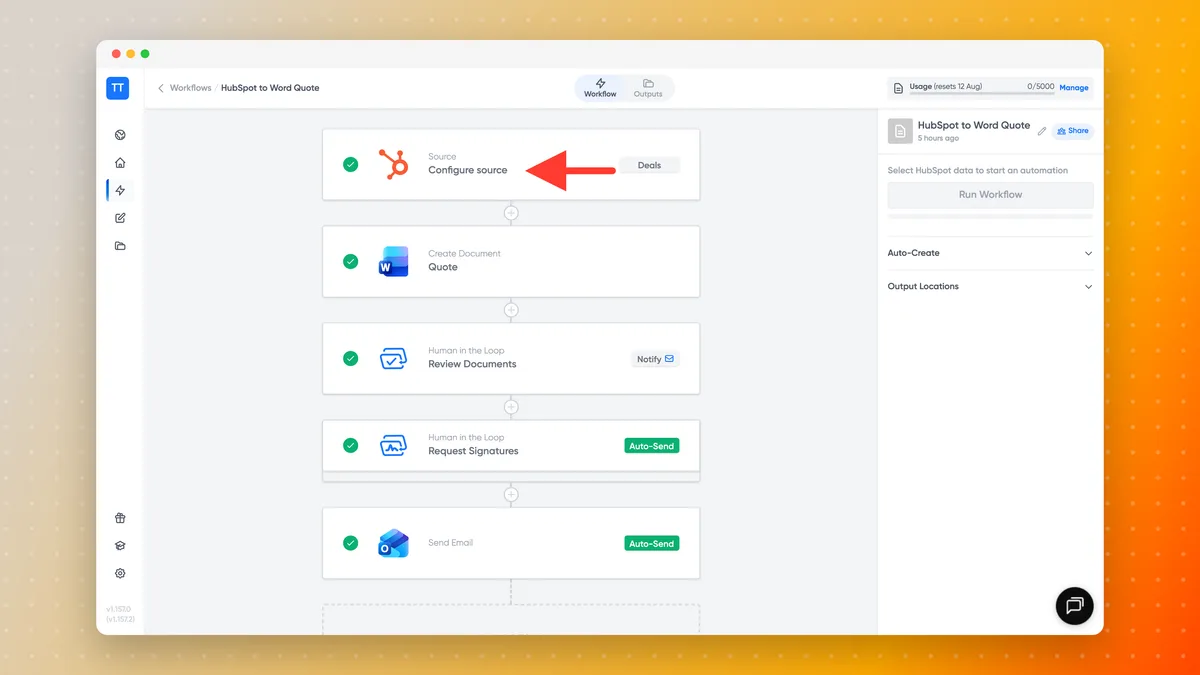
1. Connect HubSpot
Add a source to your workflow, choose HubSpot, and pick the object the document should read from. Deals is the usual answer for a quote or a proposal, but Contacts, Companies, Tickets and your Custom Objects are all available, and every custom property comes with them. If your account is not connected yet, Portant prompts you to connect it before you go on, and it does the same for Microsoft and Outlook when you reach those steps.
2. Pick your Word or PowerPoint template
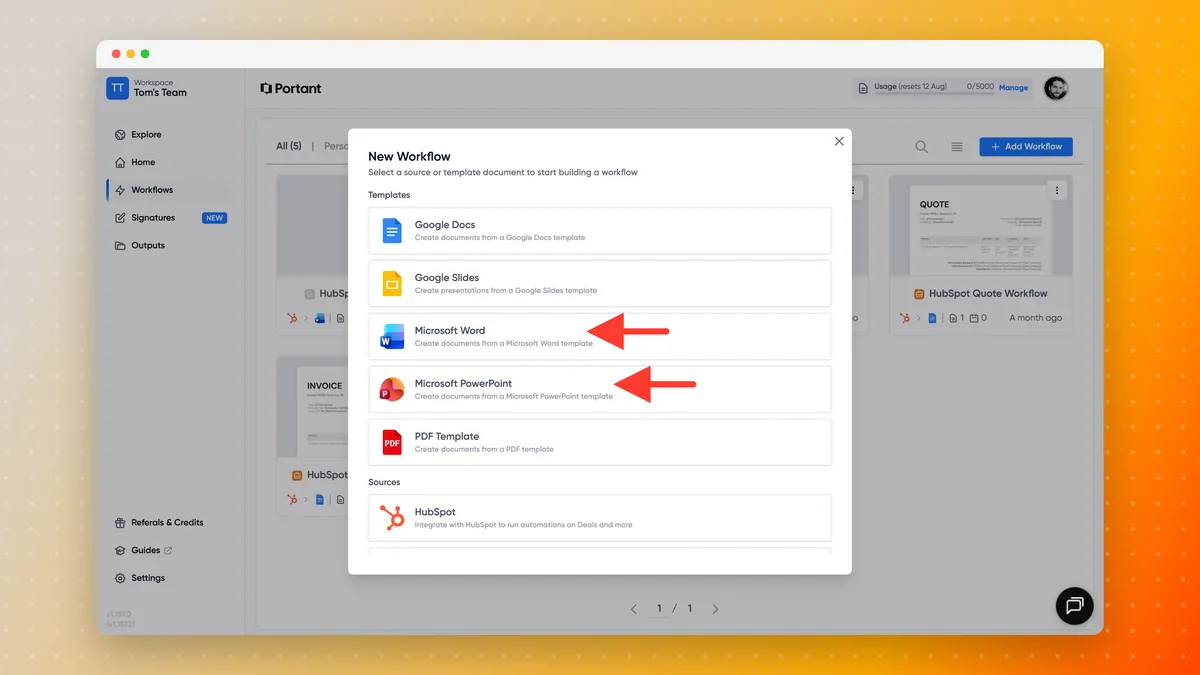
Click Add Workflow and choose Microsoft Word, or Microsoft PowerPoint for a deck. Portant asks for permission to reach your files the first time, then you pick the .docx from your OneDrive, or from Shared and SharePoint if the template belongs to your team.
The docs cover the detail for Word templates and PowerPoint templates.
3. Personalize it in Word, with the add-in
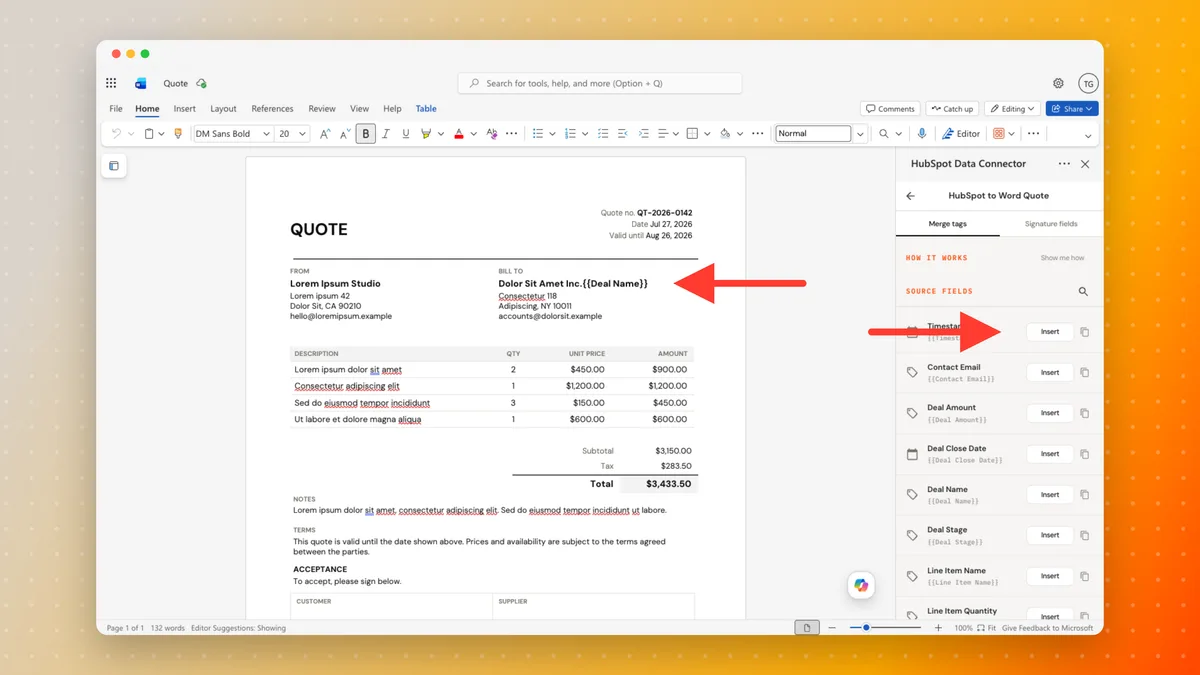
This is the part the add-in is for, and the part that used to mean copying tags between two windows. Open your template in Word, search for add-ins in the search bar, and pick the Portant connector. Choose your workflow and the Merge tags tab lists every field from your HubSpot source.
Each field shows its tag, like {{Deal Amount}}. Click where you want the value in your document, then click Insert, and that tag lands at your cursor, as the two highlights below show. You can copy a tag instead and paste it wherever you like. Either way it is just text in your own file, so you style it with Word's own formatting tools. The Signature fields tab beside it does the same job for the places a signer needs to sign.
4. Add an approval step and signatures
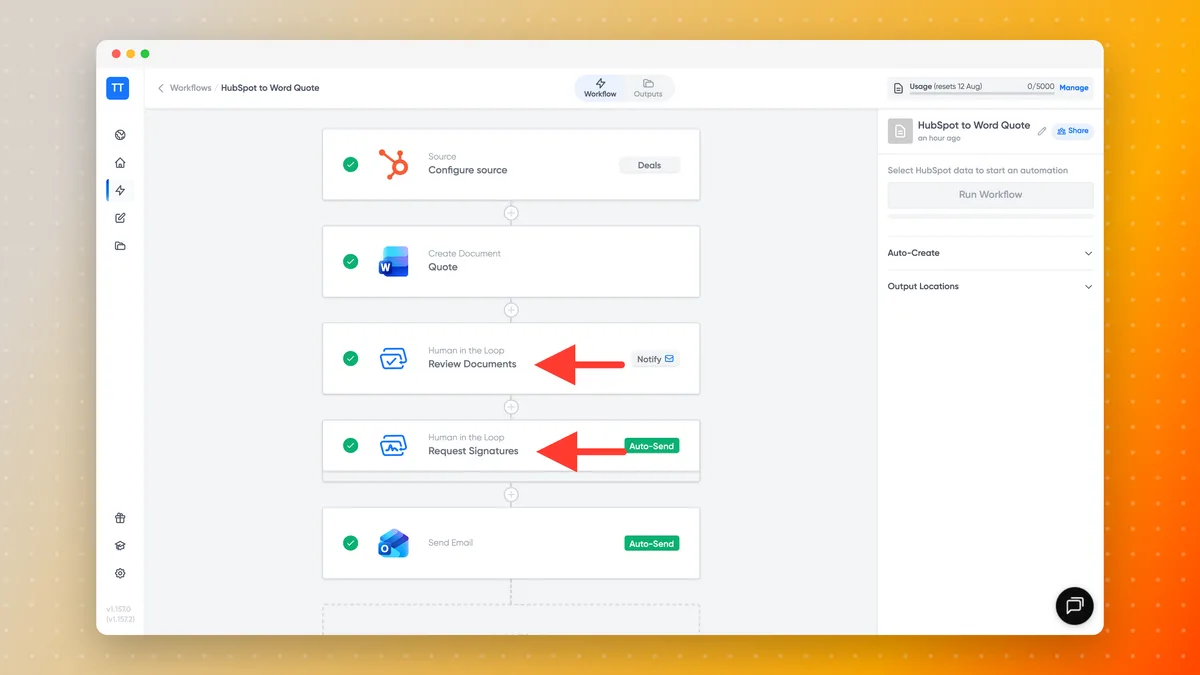
Contracts, NDAs and anything with a price on it usually need a person in the loop before they leave the building, so add a block for that. Review Documents pauses the workflow until someone approves, which is what you want on a discount, a non-standard clause or a contract going to a new customer. Request Signatures then sends the finished file out for signing, with multiple signatories and an order if the agreement needs them, and the signed copy comes back to the deal.

More on eSignatures if that is the part you care about.
Send it from Outlook, and once signed or approved, it all syncs back to HubSpot
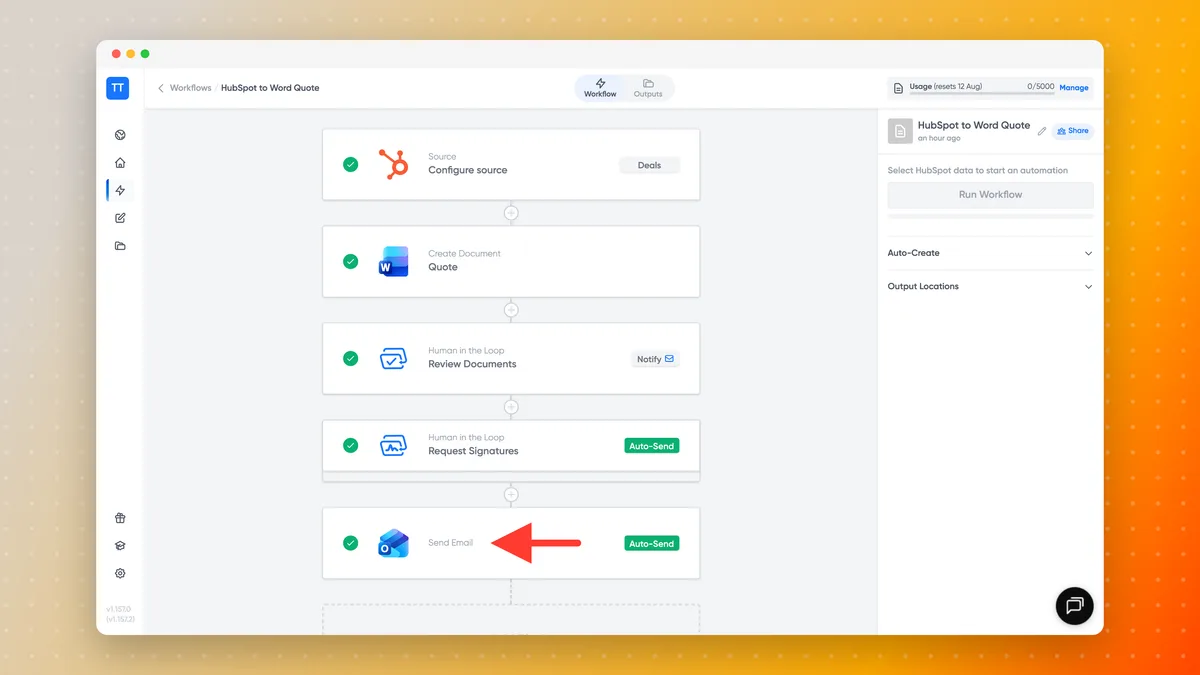
Add a Microsoft Outlook block and the finished document goes out as a personalized email from your own mailbox, with the file attached or shared. Opens and clicks track back to the deal, so you follow up at the right moment rather than guessing. Portant walks you through connecting Outlook the first time you use it.

Nothing needs re-filing afterwards. The signed or approved copy, the document status and the opens and clicks all come back to the deal itself, so the record tells you where the agreement stands without anyone updating it by hand. Each document is stored as a HubSpot App Object, so you can filter it, report on it and automate on it like any other record, and the file itself saves back to your OneDrive. Unlike PandaDoc, DocuSign and Proposify, the document is a native HubSpot record with real engagement signals feeding your dashboards, not a file lost in someone's inbox. The docs cover where your created documents live and email tracking in more depth.
Make it hands off
Once a template is set up, nobody needs to click Generate at all. Portant runs as an action inside HubSpot Workflows and as a Breeze Tool, so a document can generate itself on a deal stage change, a form submission or a ticket update, then route through review, signing and send on its own. The docs show how to trigger it from a HubSpot workflow, and how to create a document from a record by hand.
How to get it
Find Portant on the Microsoft Marketplace, add it, and connect your HubSpot account. It is free to start. If you are already with us, your workflows and templates are right where you left them. And if it saves your team time, a quick review on the Marketplace genuinely helps other Microsoft teams find it.
The tools you open every morning never needed replacing. They needed your CRM wired in. Now they do, in Google Workspace and in Microsoft Office. I cannot wait to see what you build with it.
James
CEO at Portant